

Where Do My Ads Show? Avoiding Objectionable Content

While Google search ads appear only on Google search results pages, other types of ads can appear in a wide variety of locations. With Google display and video campaigns, your ads can show on an unlimited number of websites, YouTube channels, and other locations on Google’s vast content network. But what happens if your ads show next to content that is objectionable or doesn’t match your brand? This can potentially send the wrong message to possible customers, so it’s important to know and control where your ads are showing. Fortunately, this can be done both proactively and reactively.
Proactive Approach
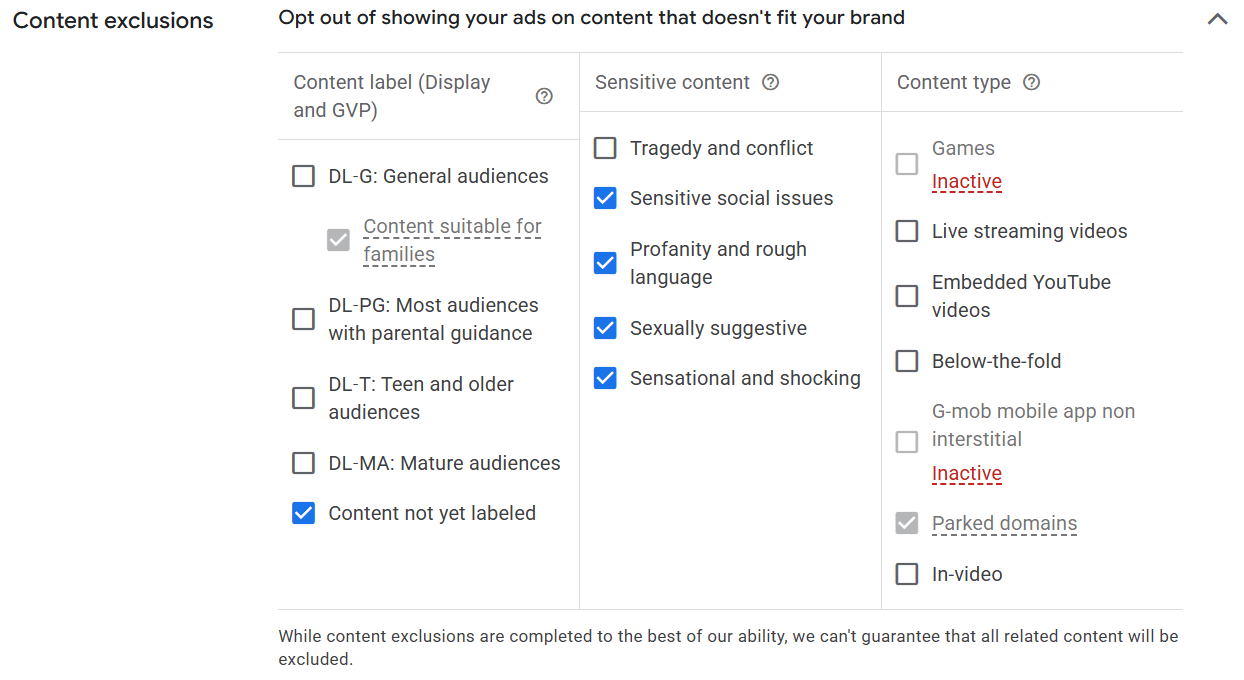
For a more proactive approach to controlling where your ad content shows, one can utilize account and campaign settings within Google. To do this, you can go to the Content Suitability menu under Tools in the Google Ads platform. Once there, you have a number of options for account-level exclusions. These include:
- Overall Inventory – With this setting, advertisers can select a holistic approach to how they want this handled, ranging from the more permissive “expanded” inventory that allows most content to the more restrictive “limited” inventory that only allows the ads to show with content that is moderate in nature.
- Sensitive Content – This advanced setting lets you opt out of ads showing with sensitive content, such as profanity, sexually suggestive material, or social issues.
- Types and Labels – Another advanced setting, this time allowing advertisers to opt out of content based on age appropriateness (think G to MA, as in movie and television ratings) or placement. The latter option is especially important for not showing on parked domains, which are websites with no original content.
- Themes – Lastly, an advanced setting that lets users opt out of their ads showing on content based on theme. This includes topics such as politics, religion, or sensitive health information.
Reactive Approach
Even if utilizing the above proactive methods for content exclusion, it is highly recommended to review and adjust where ads are being shown on a reactive level as well. In most campaigns, users can view where their ads are being shown by going to the “When and where ads showed” report under “Insights and Reports” on the Campaigns section of Google Ads. There, you can view what websites, apps, and YouTube channels your ad content has shown on, alongside data such as clicks, conversions, and views. With this information, you can now curate an exclusion list for individual sites, apps, and video channels by selecting the offending item and marking it for exclusion. Here are some examples of what might need to be excluded:
- Websites or apps that do not match your brand’s core values
- Spammy, low-value websites with no original content
- Games and websites that promote games
- Foreign websites, apps, or channels
At PaperStreet, we opt out of the most sensitive topics and placements like parked domains as a default best practice. We also monitor placements and make exclusions based on these reviews to keep the ads showing in appropriate places. If you are working with an agency, such as PaperStreet, always be sure to inquire about these placements and give feedback so they know what to look for and exclude that might not be obvious to a seasoned marketing agency. Your brand identity is one of your most important assets, so taking steps to protect it is essential when advertising online.

Join our newsletter, where you will learn educational info on latest insights, tips and best practices.
Share:
About Us
Did you know more than 200 clients have worked with PaperStreet for more than 10 years?
Get a Free Website
Analysis and Consultation
Marketing Services