

Supercharge Your Website for SEO- Speed Optimization for Law Firms, Professionals, and Businesses!
When it comes to building a top-ranking website, there are no cutting corners at PaperStreet. We fine-tune every detail, from accessibility testing to SEO analytics. But there’s one area where slow and steady never wins the race—page load speed.
Thousands of potential clients view your website on various devices. They expect a seamless browsing experience, and speed plays a major role. Slow page load time is a huge turnoff, leading potential clients to leave before viewing your content.
We can all agree that slow page load time is a huge turnoff. A website may feature the most cutting-edge widgets, graphics that will knock your socks off, and a plethora of other bells and whistles, but if it takes several seconds to actually load, more often than not, prospective clients will leave before ever actually viewing the page content.
At PaperStreet, we prioritize speed optimization, attracting clients, keeping them coming back, and improving your search ranking results. Say goodbye to headaches and welcome a flat-rate plan for a high-performing website!

Unveiling the Impact of Website Speed
Various factors can influence your site’s speed, from simultaneous page hits to bandwidth, cache, file types, and firewalls. Slow-loading pages can lead to visitor frustration, causing them to leave your site and lose clientele.
Bottom Line Impact:
- 47% of web surfers expect pages to load in two seconds or less.
- After three seconds, 40% of Internet users will abandon a site.
- A three-second delay decreases customer satisfaction by 16%
- A mere one-second delay leads to seven percent fewer conversions.
Key Benefits of Website Speed Optimization for SEO:
Boost Client Satisfaction and Conversion:
Provide a stress-free web browsing experience that attracts and retains clients, increasing conversion rates.
Greater Accessibility:
Eliminate elements that slow down your website, ensuring clients can access it seamlessly on any device, anywhere.
Higher Search Engine Ranking:
Faster site response time leads to improved search result rankings. Our optimization aligns with Google’s guidelines, giving you a competitive edge.
Speed Optimization: Boosting Your Website’s Performance
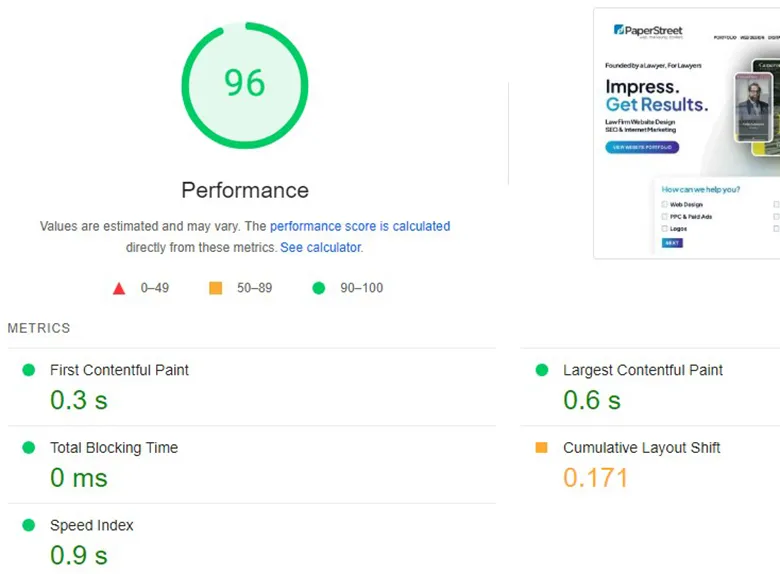
At PaperStreet, we understand the critical role of webpage loading speed in search engine rankings. That’s why we adhere to Google’s PageSpeed Insights guidelines, aiming for scores above 80 (out of 100) to ensure top-notch performance
Here’s how we optimize your site for speed:
- Image Optimization:We reduce image file sizes without compromising quality, enabling faster page loading as images often contribute to download delays.
- Server Response Time: Analyzing various factors affecting server response time, we aim for a response time under 200ms, ensuring swift browser requests.
- Browser Caching: We leverage caching policies, enabling your server to access cached resources efficiently, saving precious download time.
- Compression Magic: By compressing CSS, HTML, and JavaScript files, we significantly reduce resource download times, with gzip compression shrinking responses by up to 90%. With our expertise, your website will excel in speed and conversion, propelling you to the top ranks in search results.
Website Speed Optimization Tips
A slow website can cost you potential clients, as even a few seconds of delay can significantly increase bounce rates. Optimizing your law firm’s website speed is a crucial part of your marketing, ensuring a smooth and professional experience for every visitor.
- Optimize Images for the Web: High-resolution images look great, but if they’re not properly optimized, they can be massive file sizes that drag down your page load times. Before uploading, compress images using tools like TinyPNG. Choose appropriate file formats (JPEG for photos, PNG for graphics with transparency). Specify image dimensions in your HTML to prevent layout shifts.
- Leverage Browser Caching: When a visitor lands on your site, their browser downloads various files (images, CSS, JavaScript). Browser caching stores some of these files locally, so on subsequent visits, the browser doesn’t have to re-download everything, leading to much faster load times.
- Minify CSS, JavaScript, and HTML: “Minification” is the process of removing unnecessary characters (like white space, comments, and line breaks) from your code without changing its functionality. This reduces the file size of your code, allowing it to download faster.
- Prioritize Above-the-Fold Content (Lazy Loading & Critical CSS): “Above-the-fold” refers to the content visible on the screen without scrolling. By prioritizing this content, you can make your site feel faster even if the entire page hasn’t fully loaded yet. Implement lazy loading for images and videos that are below the fold. This means they only load when a user scrolls down to them. Additionally, consider extracting and inlining “critical CSS” – the minimal CSS required to render the above-the-fold content – directly into your HTML.
- Utilize a Content Delivery Network (CDN): A CDN is a geographically distributed network of servers. When a user requests content from your site, the CDN delivers it from the server closest to them, significantly reducing latency and improving load times, especially for a geographically diverse client base.
Website Speed Optimization Checklist
When we’re auditing a law firm’s website for speed improvements, this is a checklist of some of the things we look at:
- Initial Page Load Time: What is the first impression? (Under 2-3 seconds is ideal)
- Time to First Byte (TTFB): How long does it take for your server to respond? (Lower is better, ideally under 200ms)
- Fully Loaded Time: How long until everything on the page has loaded?
- Number of HTTP Requests: Each element (image, script, stylesheet) requires an HTTP request. Fewer requests generally mean faster loading.
- Image File Sizes: Are the images optimized for the web?
- Presence of Render-Blocking Resources: Are there CSS or JavaScript files preventing your page from displaying quickly?
- Browser Caching Implementation: Is caching enabled and configured correctly?
- Minification of Code: Are your CSS, JavaScript, and HTML files minified?
- Mobile Responsiveness & Speed: How does your site perform on mobile devices? (This is often a bigger concern than desktop)
- Broken Links or Missing Assets: These can cause delays as the browser tries to locate them.
Website Speed Optimization by PaperStreet
Is your website fast? PaperStreet websites are. See what we can do to make your law firm website lightning speed.